Custom AI automation solutions that work 24/7 — no tech skills needed, no hype. Just clear systems that eliminate the work that's slowing you down.
Your team spends countless hours on tasks that could be automated. While they're stuck in the weeds of repetitive work, strategic initiatives get pushed aside, opportunities slip through the cracks, and growth stalls.
Your talented employees spend 40–60% of their time on repetitive, low-value work instead of using their skills for strategic thinking and innovation. Morale suffers when people feel like robots.
Copying information from emails to spreadsheets, from forms to CRMs, from one system to another. Hours vanish into data entry that could be instant and automatic.
Human error is inevitable with repetitive work. Typos, missed fields, duplicate entries, and inconsistent data quality create cascading problems throughout your business.
Manual processes can't scale. As your business grows, these bottlenecks become critical constraints. You're forced to choose between hiring more people or limiting growth.
What if your systems worked while you slept? AI workflow automation handles repetitive tasks 24/7, freeing your team to focus on what humans do best: strategy, creativity, and relationship building.
AI workflow automation uses artificial intelligence to handle business processes that traditionally required human judgment. Unlike simple "if-this-then-that" automation, AI can understand context, make decisions, learn from patterns, and adapt to variations in your workflows.
Traditional automation follows rigid rules: "When email arrives, file it in folder A." It breaks when anything unexpected happens.
AI automation understands intent — it determines if an email is a customer inquiry, vendor invoice, or team communication, extracts relevant information, routes it appropriately, and takes the next logical action. It handles variations, exceptions, and nuance.
The power of AI automation lies in connecting your existing systems. Instead of replacing your tools, I create intelligent workflows that make them work together seamlessly. Your email talks to your CRM. Your forms populate your database. Your e-commerce platform updates your inventory system — all automatically, all intelligently.
The result? Your business operates like a well-oiled machine, with information flowing automatically where it needs to go, tasks completing themselves, and your team freed from the tedium of manual processes.
Transform these time-consuming processes into automated systems that run without you.
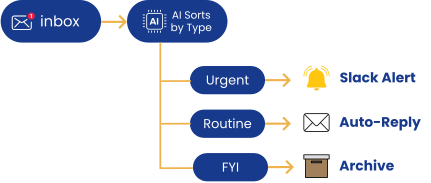
Automatically sort incoming emails by category, priority, and sender. Generate appropriate responses to common inquiries. Schedule follow-ups and flag urgent items for immediate attention.
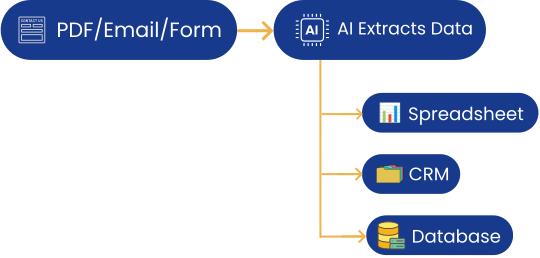
Extract information from PDFs, emails, scanned documents, and forms. Automatically populate databases, spreadsheets, and CRM systems. Validate data quality and flag inconsistencies.
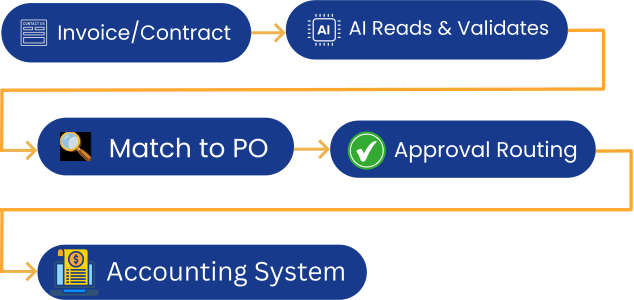
Process invoices, receipts, contracts, and forms automatically. Extract key information, validate against purchase orders, route for approval, and update accounting systems.
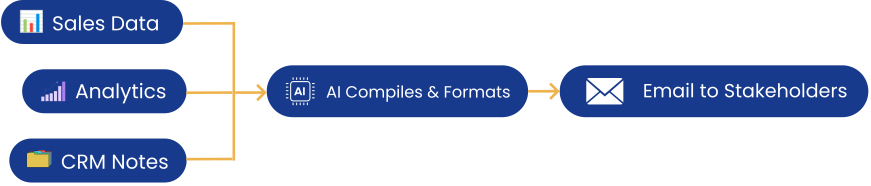
Compile data from multiple sources, generate formatted reports, create visualizations, and distribute to stakeholders automatically. Daily, weekly, or monthly — always on time, always accurate.
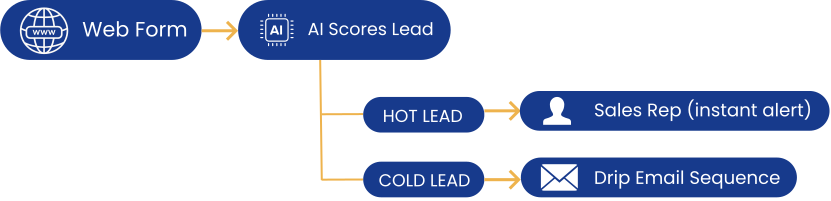
Qualify incoming leads based on your criteria, route to the appropriate team member, send personalized follow-up sequences, and update your CRM with all interactions automatically.
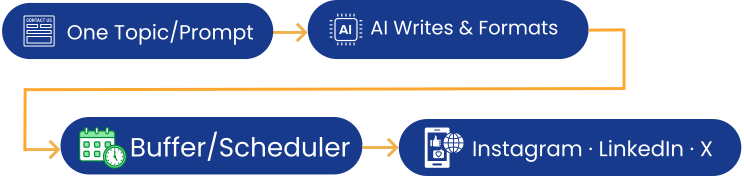
Schedule content across platforms, monitor mentions and keywords, respond to common questions, flag priority interactions for human review, and compile engagement reports automatically.
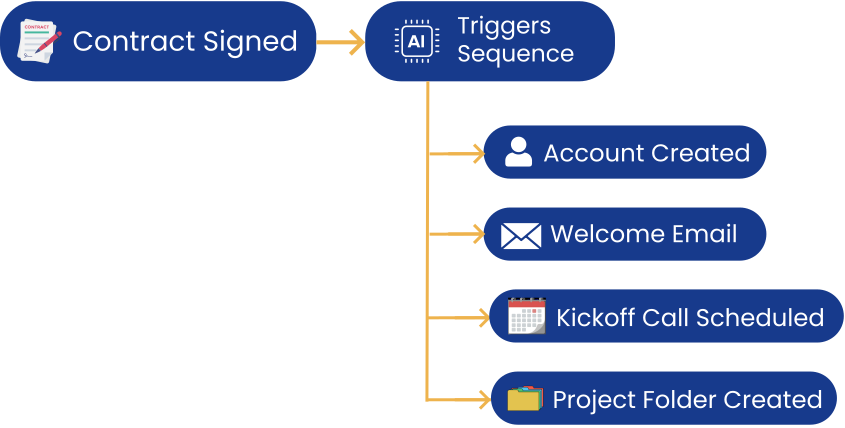
Trigger welcome email sequences, create customer accounts, schedule onboarding calls, send educational content, collect necessary information, and ensure nothing falls through the cracks.
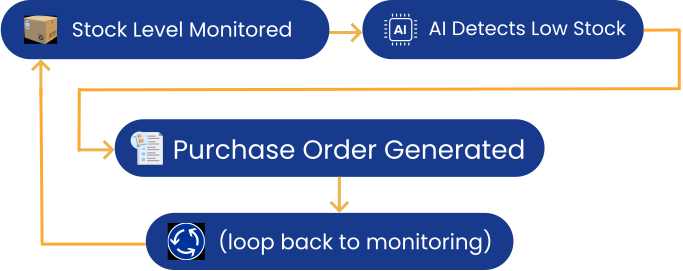
Monitor stock levels in real-time, trigger reorder alerts when inventory is low, generate purchase orders automatically, update multiple systems when items arrive, and forecast inventory needs.

|
Quick ROI CalculationIf automation saves your team just 10 hours per week at an average rate of $30/hour: Monthly Savings: $1,300 Annual Savings: $15,600 Most businesses save far more — often 20–40 hours per week across their team. The ROI is typically positive within the first month. |
No need to replace your existing tools — I make them work together intelligently.











Don't see your tool? I can connect to virtually any platform that has an API or data export capability. Ask me about your specific systems →
Logos are trademarks of their respective owners and are used here solely to indicate platform compatibility.
Real, measurable impact across your entire operation.
Eliminate hours of manual work per employee. Redirect that time to revenue-generating activities, strategic planning, or simply better work-life balance.
Human error is inevitable with repetitive tasks. AI automation performs the same action the same way, every time, with 95–99% accuracy. No more typos, missed fields, or data inconsistencies.
Handle 2x or 10x more volume without adding headcount. Automated workflows scale infinitely without proportional cost increases.
Automation doesn't sleep. Leads get qualified instantly, customers receive immediate responses, and processes complete in minutes instead of days.
Information updates across all systems simultaneously. No more outdated data, manually updating multiple spreadsheets, or wondering which version is correct.
Free your team from repetitive tasks. They can focus on what humans do best: creative problem-solving, relationship building, and strategic thinking.
My proven 7-step process from audit to live automation.
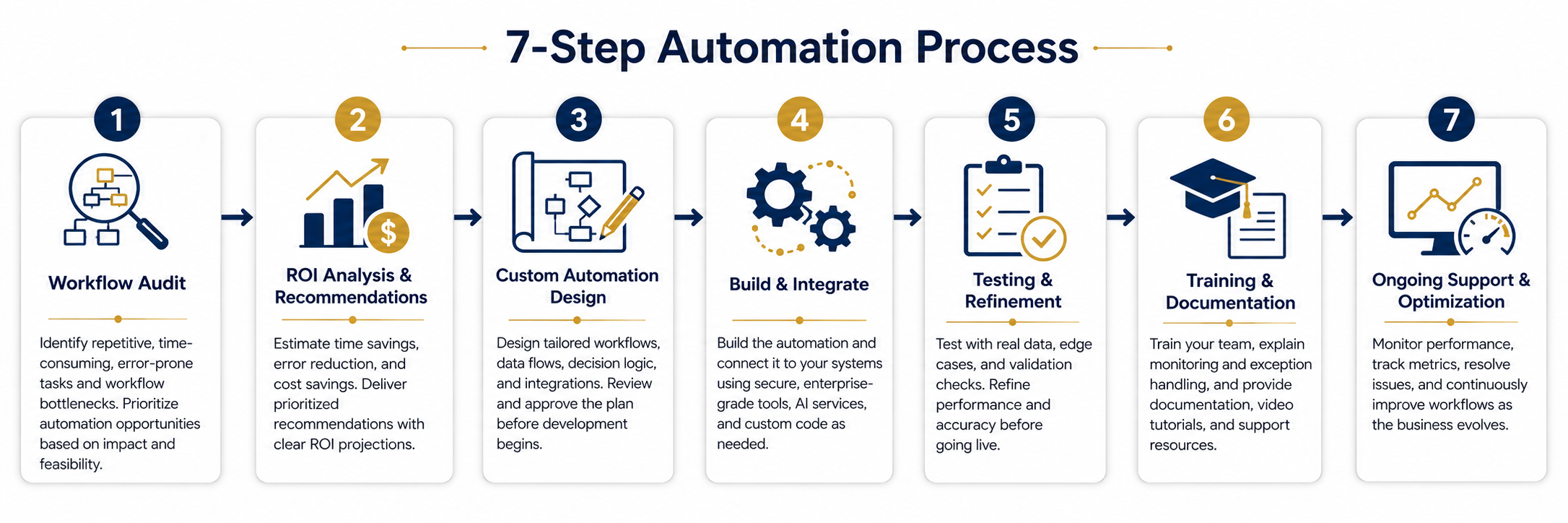
I conduct a comprehensive audit of your current processes. Through conversations with your team and observation of daily workflows, I identify tasks that are repetitive, time-consuming, error-prone, or bottlenecks — then prioritize opportunities based on impact and feasibility.
For each automation opportunity, I calculate the potential time savings, error reduction, and cost savings. You get a prioritized list of recommendations with clear ROI projections so you can make informed decisions about what to implement first.
I design the automation workflows tailored to your specific processes and systems — mapping data flows, designing decision logic, planning integrations, and creating detailed specifications. You review and approve before development begins.
I build the automation workflows and integrate them with your systems using enterprise-grade automation platforms, AI services, and custom code as needed. All integrations are secure, reliable, and built to enterprise standards.
I thoroughly test with real data in a safe environment — hundreds of test cases, edge cases, data accuracy validation, and performance tuning. Only when everything works perfectly do I move to production.
I train your team on how the automation works, how to monitor it, how to handle exceptions, and how to request changes. Comprehensive documentation, video tutorials, and ongoing support resources included.
Automation isn't "set it and forget it." I monitor performance, track metrics, identify optimization opportunities, handle any issues, and continuously improve the workflows as your business evolves.
Timeline: Simple automation can be live in 1–2 weeks. Complex, multi-system integrations typically take 4–8 weeks. Most projects show positive ROI within the first month of operation.
Transparent pricing with no surprises. Every package includes a satisfaction guarantee.
Best for: Small businesses, single-process automation, testing the waters
Best for: Growing businesses, multiple processes, comprehensive automation
Best for: Large organizations, complex ecosystems, mission-critical automation
Recommended for: All automation clients — peace of mind and continuous improvement
Example: A team of 5 spends 3 hours/day on automatable tasks — that's 75 hours/week.
At $30/hour: you're spending $2,250/week or $117,000/year on manual work.
A $7,500 Workflow Package eliminating 80% of that saves $93,600 annually.
ROI: 1,148% in year one.All packages include a satisfaction guarantee. If the automation doesn't save you time and money, I'll make it right.
Almost any repetitive, rule-based task is a candidate. Good targets include:
The best way to know is to book a free assessment — I'll evaluate your specific processes and give you a clear picture.
Timeline varies by complexity:
Most clients have their first automated workflow live within 2–3 weeks. I prioritize high-impact automations first so you see ROI quickly while I continue building.
Almost certainly yes. I can integrate with virtually any system that has an API, web interface, or data export. During the initial assessment, I'll verify compatibility with your specific tools and explain exactly how the integrations will work.
Business processes evolve, and your automation should too. My Monthly Support package covers modifications as your processes change, updates when integrated systems add new features, and ongoing optimization. Most clients find it more cost-effective than hourly changes.
Zero. That's the point. I handle all technical complexity. You'll see dashboards showing automation performance, view logs of completed actions, and be able to pause or resume workflows with a button. I provide training tailored to your team — many clients have no technical background at all and manage their automations confidently after onboarding.
Schedule a free automation assessment and discover which processes are stealing your team's time — and exactly how much you could save.
Or email me directly: admin@transformativeaisolutions.com
I respond within 24 hours and can typically schedule assessments within 3–5 business days.
 Transformative AI Solutions